Create a transaction and screen variant for VA01 (Sales order creation standard transaction)

Showing posts with label SAP Tcode. Show all posts
Create a transaction for OO method of a class
We can create a transaction code for public method of global class using OO transaction model or a class defined in the local program without checking OO transaction model.
Scenario: We have created a local class Z_CLASS_METHOD with public methods, Display in ZLOCAL_DEMO module pool program. Now we would like to have a transaction code for method Display. Display method will display a message like “Transaction code for OO method class”.
Create a transaction for report program
Scenario: There are many ways to create a transaction code for report program.
We are creating a transaction code for report ZABC which has default screen(1000).
ZABC report is a sample report for displaying a test string. Once the transaction for report is executed text ‘Sample for report transaction ' will be displayed.
Create a transaction for dialog program
Scenario :We are going to create a transaction code for dialog program Z_DIALOG_TEST with screen 1000 .In screen 1000 we have a text field “sample transaction for dialog program” that will be display once the transaction is executed.
Create a variant for Transaction code
The Transaction code variant is used to organize the initial Screens of SAP transactions, and is user specific. These types of variants can be used to pre-populate field(s) each and every time that particular transaction is accessed.
have to be pre-populated.
Click on the save button .


Creating a variant using Selection variables
Variants can also be set up to hide field(s), make field as ‘required’
well as lock in parameters into the fields that should not be changed. Fields that
are dynamic, such as date field, can also be set up so that a certain parameter
defaults or can be pre-populated based on requirement. These types of fields
are known as ‘Selection Variables’.
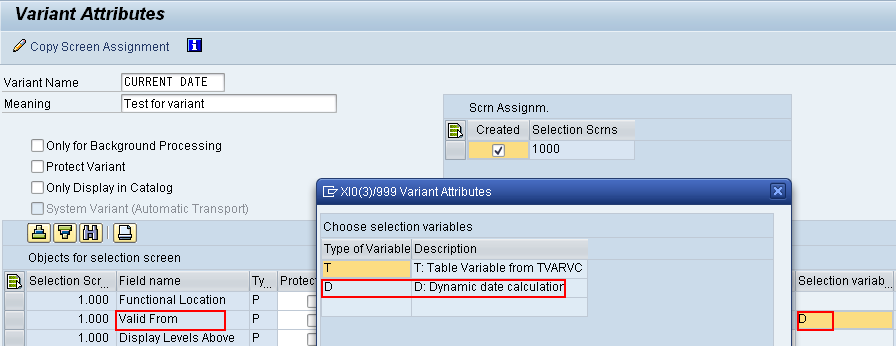
In this example , a variant will be created such that the ‘Valid From' date will
default to the current date.

Example:
A variant can be created for any transaction.
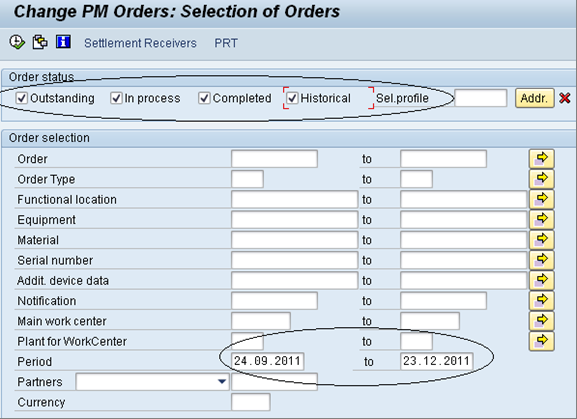
As an example I have chosen IW38 (Change PM Orders) transaction.
- In the initial screen of the transaction, populate the search fields that you desire to be pre-populated.
- Click on the save button
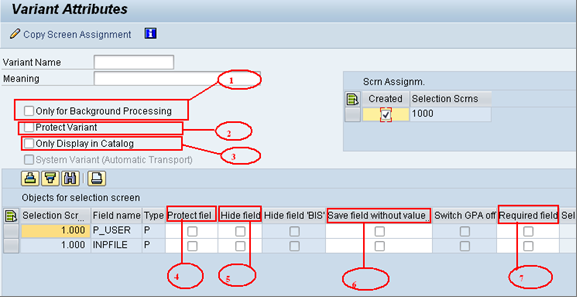
- Enter the Variant name and Description.
- Check the check boxes under ‘Required fields’ column for all the fields that
have to be pre-populated.
Click on the save button .
- Click on the variants button(
Creating a variant using Selection variables
Variants can also be set up to hide field(s), make field as ‘required’
well as lock in parameters into the fields that should not be changed. Fields that
are dynamic, such as date field, can also be set up so that a certain parameter
defaults or can be pre-populated based on requirement. These types of fields
are known as ‘Selection Variables’.
In this example , a variant will be created such that the ‘Valid From' date will
default to the current date.
- Open transaction IH01 (Functional Location structure display).
- While saving select the variant name i.e. CURRENT DATE
- Click on the Save button .
Workflow Transaction codes
· Customization Settings:
- SWU3
- Automatic Customizing Workflow.
- SCOT
- SAP to mail server Configuration
- SU01
- User Maintenance
· Workflow Design:
- SE37
- Function Builder
- SE38
- ABAP Editor
- SWO1
- Business Object Builder
- PFTC
- Task Maintain
- SWDD
- Workflow Builder
· Runtime
Behavior/Analysis:
- SBWP
- Business Workplace
- SWUD
- Workflow Diagnosis
- SWU_OBUF
- Synchronize Runtime Buffer
- SWPR - Workflow Restart After Error
Subscribe to:
Posts (Atom)