Showing posts with label SAP. Show all posts

Generate number for an object using NUMBER_GET_NEXT

 Generate number for an object using NUMBER_GET_NEXT

The  requirement was to generate a unique internal number for vendor address.

This is a function module to generate a  unique internal number in SAP system .
First of all FM NUMBER_RANGE_ENQUEUE
will lock the number range generator and then  
FM NUMBER_GET_NEXT will get the next available number 
FM NUMBER_RANGE_DEQUEUE will unlock the FM


web service for a (RFC)FM


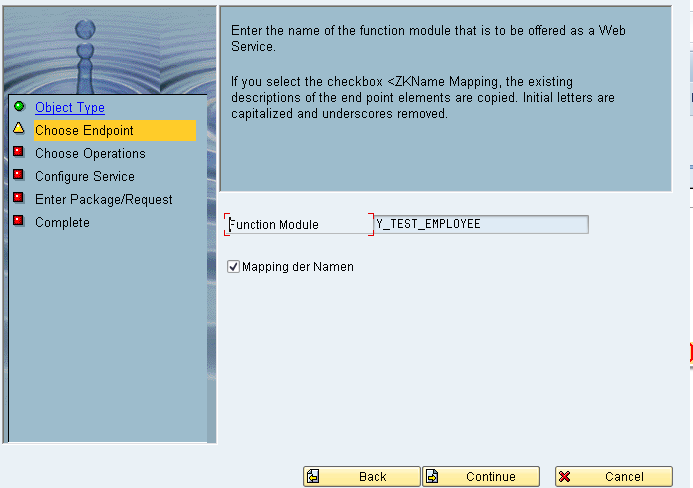
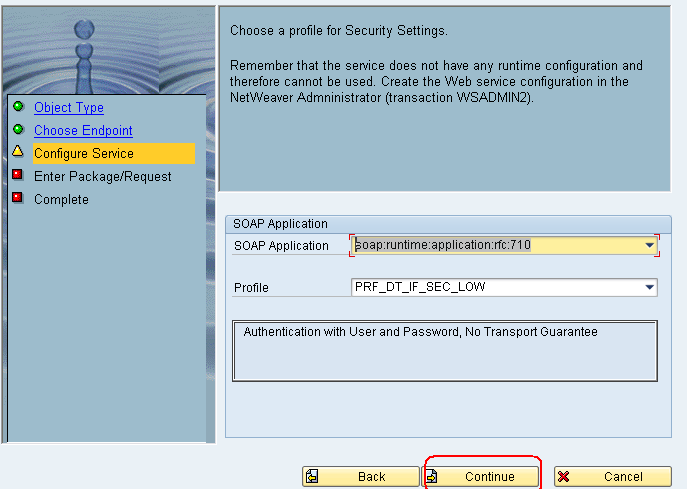
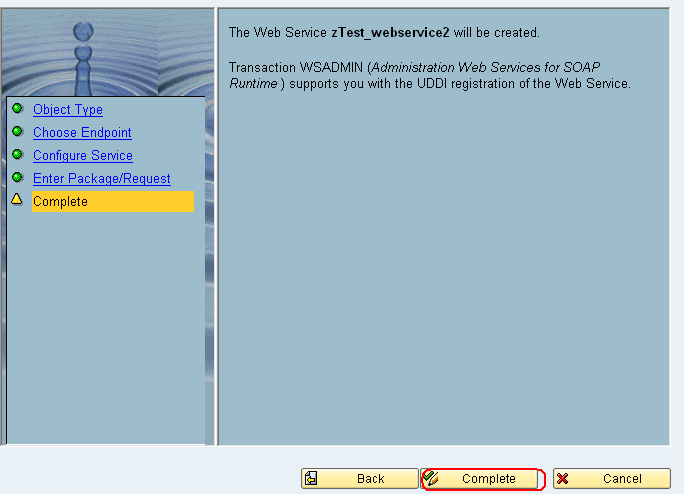
Craete a function module and use it as a web service.

In this example we have created a web service for a  (RFC)FM .

Step 1.Go -->se 37 -->create a (RFC) function module

Import parameter
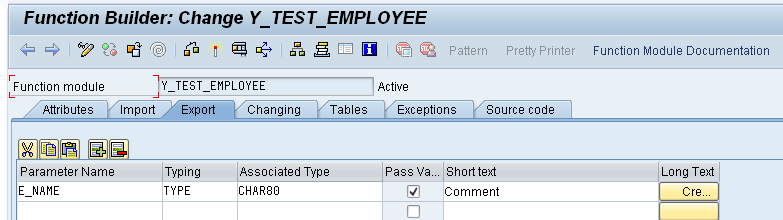
Export parameter


Code for the function module

DATA :  L_T_0105 TYPE  STANDARD TABLE OF P0105,
          WA_0105  
TYPE  P0105.

  
CALL FUNCTION 'HR_READ_SUBTYPE'
       
EXPORTING
*    TCLAS                 = 'A'
         PERNR                 
PERNR
         INFTY                 
'0105'
         SUBTY                 
'0001'
*    SPRPS                 = '*'
        BEGDA                 
SY-DATUM
        ENDDA                 
SY-DATUM
       
TABLES
         INFTY_TAB            
=  L_T_0105[]
      
EXCEPTIONS
        INFTY_NOT_FOUND       
1
        INVALID_INPUT         
2
        
OTHERS                3
               .
  
IF SY-SUBRC <> 0.


ENDIF.
  
SORT L_T_0105 BY ENDDA DESCENDING.
  
READ TABLE L_T_0105 INTO WA_0105 INDEX 1.
  
IF SY-SUBRC 0 .
    
WRITE WA_0105-USRID TO  E_NAME.
    
CLEAR WA_0105.
  
ENDIF.


Save it to local
l

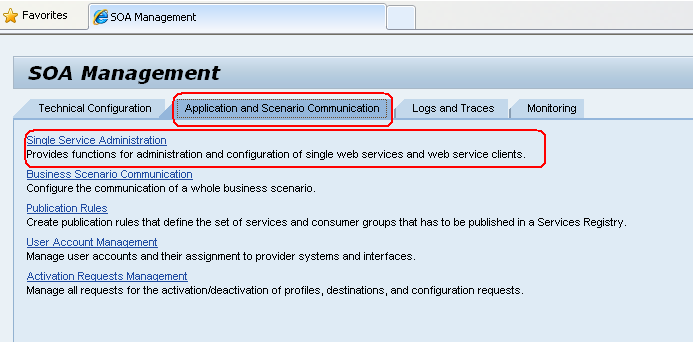
Now go to the tcode soamanager the below screen will appear in web browser
Go to the single service administration


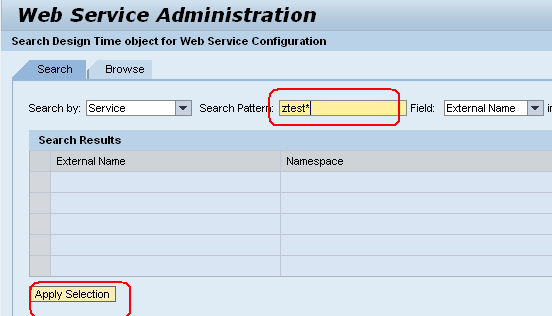
We will get the list of web services now choose zTest_webservice (motioned while creating the web services)

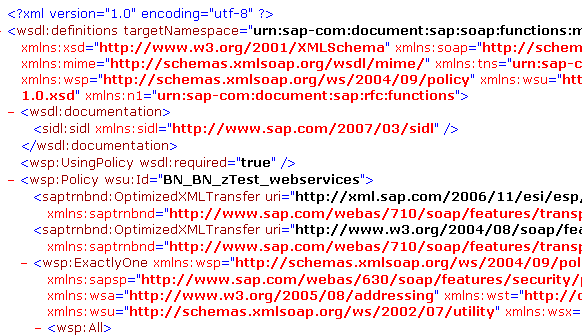
This will open WSDL save as XML


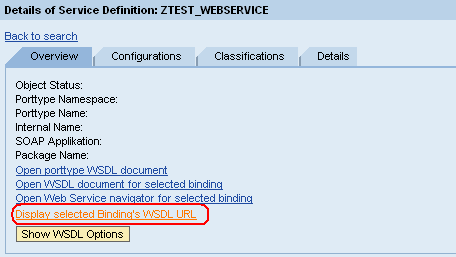
Now go to the click display binding WSDL URL


Example: http://:8000/sap/bc/srt/wsdl/bndg_E13C4BD379AE8AF1BF850026554B371E/wsdl11/
allinone/ws_policy/document?sap-client=011

Go the EP portal and run the web services using above link
Protected by Copyscape Web Copyright Checker


Create a Layout Variant


A Layout variant can be used to pull in additional information into a list display and organize the information to a User’s specifications. This type of variant is again User specific. Layout variants can be created for any Transaction.

In this example, A Layout variant is created for transaction IW28( Change
Notification).

A Layout variant can be used to pull in additional information into a list display and organize the information to a User’s specifications. This type of variant is again User specific. Layout variants can be created for any Transaction.

In this example, A Layout variant is created for transaction IW28(Change
Notification).
On the initial screen, enter in the desired search criteria.
In this example I am entering the ‘Notification date range’ with ‘notification status’ as Outstanding and Completed.
1.  Click on the execute button      .
         On the initial screen, enter in the desired search criteria.
   In this example I am entering the ‘Notification date range’ with ‘notification
   status’ as Outstanding and Completed.
2.  Click on the execute button.

List of tables to store Variants:

TVARV --> for storing the variants (TVARVC- client specific)VARID --> Variant directoryVARIT --> Variant texts
             
Transaction and screen variants
Transaction variant
  • Transaction variant is a used to create some tailored version of standard SAP transaction without any actual modification i.e a standard transaction can be modified as per the requirement.
  • It can be used to hide fields, menu functions, screens, to supply individual fields with default values or to change the ready for input status of one or more fields.    
Transaction variant can be created in two steps:
      1) Create a Transaction variant in SHD0
      2) Attach the transaction variant to a transaction


Protected by Copyscape Web Copyright Checker

Delete multiple WBS for a project ID

* Initialization of BAPIs
  CALL FUNCTION 'BAPI_PS_INITIALIZATION'.

  CALL FUNCTION 'BAPI_BUS2054_DELETE_MULTI'
    EXPORTING
      I_PROJECT_DEFINITION  = G_F_PROJECT_DEF
    TABLES
      IT_DELETE_WBS_ELEMENT = P_G_T_DELETE_WBS  (All WBS which needs to be Deleted)
      ET_RETURN             = P_G_T_RETURN.

  CLEAR G_F_ERROR.
  LOOP AT P_G_T_RETURN INTO G_R_RETURN.
    IF G_R_RETURN-TYPE CA G_C_AEX."Error Type A E or X
      G_F_ERROR = G_C_X.
    ENDIF.
  ENDLOOP.

* Error handling / end processing
  IF G_F_ERROR IS INITIAL.

*-- Post changes
    REFRESH L_T_RETURN2.
    CALL FUNCTION 'BAPI_PS_PRECOMMIT'
      TABLES
        ET_RETURN = L_T_RETURN2.
*-- Check for errors
    LOOP AT L_T_RETURN2 INTO G_R_RETURN.  "
      IF G_R_RETURN-TYPE CA G_C_AEX.
        G_F_ERROR = G_C_X.
      ENDIF.
    ENDLOOP.
    APPEND LINES OF L_T_RETURN2 TO P_G_T_RETURN.
*-- Everything ok
    IF G_F_ERROR IS INITIAL.
      CALL FUNCTION 'BAPI_TRANSACTION_COMMIT'
        EXPORTING
          WAIT = G_C_X.
      COMMIT WORK.
    ELSE.
      CALL FUNCTION 'BAPI_TRANSACTION_ROLLBACK'.
      REFRESH L_T_RETURN2.
      CALL FUNCTION 'BAPI_PS_PRECOMMIT'
        TABLES
          ET_RETURN = L_T_RETURN2.
      APPEND LINES OF L_T_RETURN2 TO P_G_T_RETURN.
      REFRESH L_T_RETURN2.
      CALL FUNCTION 'BAPI_TRANSACTION_COMMIT'.
    ENDIF.
* Error occured
  ELSE.
    CALL FUNCTION 'BAPI_TRANSACTION_ROLLBACK'.
    REFRESH L_T_RETURN2.
    CALL FUNCTION 'BAPI_PS_PRECOMMIT'
      TABLES
        ET_RETURN = L_T_RETURN2.
    APPEND LINES OF L_T_RETURN2 TO P_G_T_RETURN.
    REFRESH L_T_RETURN2.
    CALL FUNCTION 'BAPI_TRANSACTION_COMMIT'.
  ENDIF.